
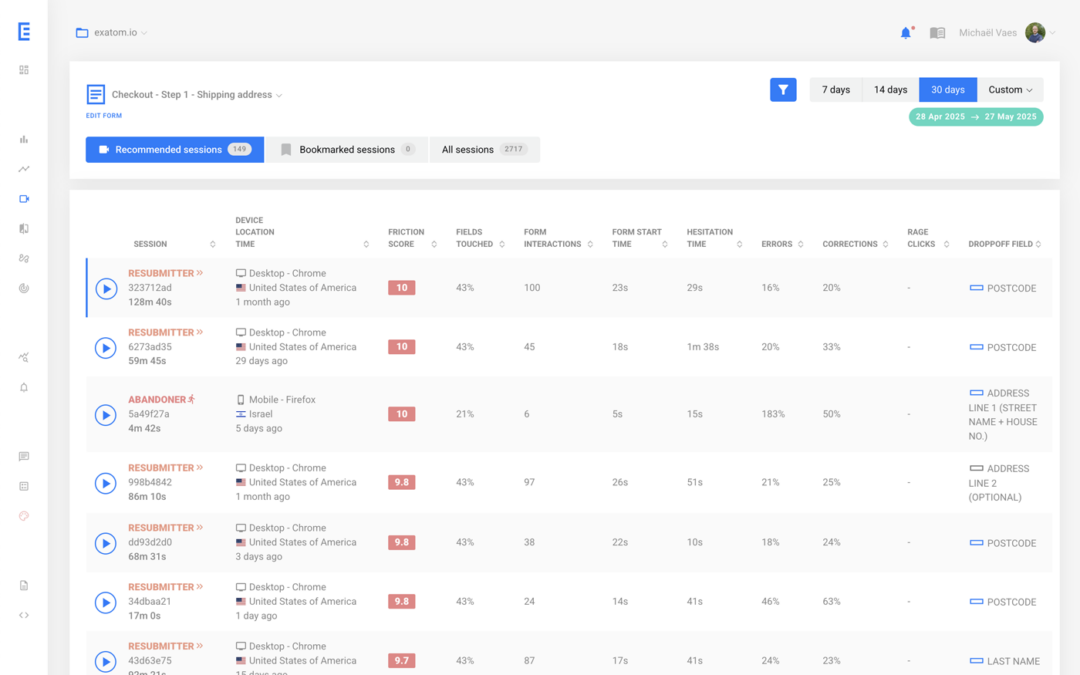

Most session replay tools sample traffic, require manual PII configuration, and leave you hunting through thousands of recordings to find form friction. The better approach for forms and checkouts is zero-sampling replay linked directly to field-level analytics — so you click a metric and land on the session that caused it, with all personal data masked by default.
Session replay tools all promise the same thing: watch what your users actually do. But the way they deliver varies enormously when your primary concern is a checkout form leaking conversions at a specific field. This comparison covers five tools — Contentsquare, Hotjar, FullStory, and Microsoft Clarity — on the dimensions that matter most for form optimisation: sampling, privacy model, and analytics linkage.
Why does session replay sampling break form analysis?
Sampling means a tool only records a fraction of all visits. For general UX research, a 20% sample is often enough to spot patterns. For form error analysis, it isn't. A user who trips over a phone number field and abandons represents a real friction point — but if that session wasn't captured, you never see it. At scale, sampling systematically hides low-frequency, high-impact errors.
The errors that cause abandonment are often rare: a date picker that fails on certain Android browsers, a postcode field that rejects inputs from a specific region, an autofill conflict on a multi-step checkout. These happen in 2–5% of sessions. If your tool samples 10–30% of traffic, many of those sessions won't exist in your data. You'll see the error rate in aggregate — but you'll never find the recording that shows what happened.
Contentsquare's own documentation confirms that session replay sampling rate is set at the contract level and can range from 0% to 100% — meaning the percentage of sessions you actually record depends on what you've negotiated, not a fixed technical limit. For teams on mid-tier plans, the effective capture rate is often well below 100%.
How do these tools handle PII data in form recordings?
Most session replay tools offer PII masking options, but require manual configuration to activate them. The default state — what gets recorded before your developers touch anything — varies significantly. Some mask form inputs automatically; others record everything and rely on you to identify sensitive fields. Default-on masking is the only approach that doesn't create compliance risk during deployment.
A 2018 study by Princeton researchers found that session replay scripts on hundreds of websites were capturing form inputs — including passwords and credit card numbers — before users submitted them. Several tools have improved their defaults since, but the burden of correct configuration still falls on the implementing team in most cases. A checkout collecting name, address, phone number, and payment details in sequence is a dense concentration of personal data. Any tool that records those fields — even briefly — creates a compliance obligation.
What is the difference between full-journey replay and form-focused replay?
Full-journey tools record everything a user does across your entire site — navigation, scroll depth, clicks, and any form interactions they encounter along the way. Form-focused tools record specifically within forms and checkouts, coupling that recording to field-level metrics. Both have genuine uses; the question is which one you actually need for conversion work.
If your primary question is "why are users leaving the checkout?", a full-journey tool gives you the whole story but buries the answer in hours of footage. Form-focused replay inverts this. You start from the metric — field X has a 22% error rate — and surface the recordings that show that error happening. The investigation collapses from hours to minutes.
There's also a depth difference. Generalist tools tell you a user spent time on a form and then left. Form-focused tools tell you which field they hesitated on, whether autofill populated it incorrectly, and what the exact error message was. That granularity converts a vague "checkout is broken" observation into a specific fix.
How do the five tools compare on sampling, privacy, and form depth?
Each tool in this comparison makes a different trade-off between breadth and depth, between price and session volume, and between out-of-the-box privacy and configurability. The table below maps the key dimensions for teams whose primary concern is form and checkout conversion.
What does each tool actually do well?
Each tool in this comparison was built for a different primary use case. Understanding that context helps you choose the right one — or the right combination. The overlap between tools is real, but the depth varies enormously depending on what you're trying to diagnose.
Exatom
Exatom is built exclusively for forms and checkouts, which changes what session replay actually means in practice. Every session is recorded — no sampling, no quotas — and all PII entered into form fields is masked by default before it ever leaves the browser. The critical differentiator is the link between analytics and replay: when a field shows a high error rate in the dashboard, clicking that number surfaces the exact recordings where that error occurred. You don't search; the data directs you. That connection — from metric to session to fix — is what makes Exatom particularly effective in high-traffic verticals like automotive, insurance, and financial services, where a single percentage point of checkout conversion is worth a great deal.
Contentsquare
A comprehensive digital experience platform with strong heatmaps, journey mapping, and zone-based analysis. Session replay is one component within a broader enterprise suite. Sampling rate is set at the contract level, so high-volume capture requires upfront negotiation. Form-specific depth is limited. Pricing typically starts at $50,000–$150,000 per year.
Hotjar
The most widely-used entry point into session replay, with a genuinely useful free tier (35 sessions/day). The Growth plan starts at $39/month for up to 7,000 sessions. At higher volumes, Hotjar distributes captures across 24-hour periods, which can mean missing peak-traffic moments. Form analytics are basic — funnel drop-off only, no field-level detail.
FullStory
Strong autocapture model and pixel-perfect replay with good search and filtering. Pricing starts around $499/month and scales with session volume; data capture pauses when quotas are hit, creating gaps that aren't always visible in the dashboard. PII masking requires manual configuration.
Microsoft Clarity
Free, with up to 100,000 sessions recorded per project per day. After 30 days, Clarity retains 1% of recordings or 10 per day — meaning infrequent form errors may be pruned before you investigate them. Uses first-party cookies, so it sits inside the consent framework and loses visitors who decline tracking.
When should you pair full-journey replay with form-focused replay?
Full-journey and form-focused replay answer different questions. Full-journey tools are best for understanding navigation patterns, identifying drop-off points across the site, and spotting UX friction outside forms. Form-focused tools are best for diagnosing exactly what goes wrong inside a form — at field level, with analytics to guide where to look. Used together, they cover the complete funnel.
A practical workflow: use a full-journey tool to identify which pages have high exit rates, then use form-focused analytics to pinpoint which fields or error messages are driving abandonment. The two tools complement each other.
Where Exatom's session replay fits in this model is as the specialist layer. In Exatom's data across automotive and insurance clients, the average phone number field carries an error rate above 19%. Finding that in a generalist replay tool means filtering by page, then session length, then watching recordings one by one. In a form-focused tool, you click the metric. Same insight; a fraction of the time.
Frequently asked questions
Questions readers ask after comparing session replay tools for form and checkout optimisation.
What is session replay sampling and why does it matter for form analysis? +
Sampling means a tool only records a fraction of all visits. For general UX research, a 20% sample is often sufficient. For form error analysis it isn't — low-frequency errors like a broken date picker on a specific browser may never appear in a sampled dataset, even when they're causing consistent abandonment.
Does Microsoft Clarity record every session for free? +
Clarity records up to 100,000 sessions per project per day at no cost. After 30 days, it retains 1% of recordings or 10 per day, whichever is higher. For form-specific analysis, this long-term data loss is a real limitation — a checkout error that surfaces once a week may be pruned before you find it.
Which session replay tools mask PII data by default? +
Most tools require manual configuration to mask personally identifiable information. Exatom masks all PII entered into form fields by default — names, email addresses, phone numbers, and payment details are never recorded. Hotjar and Microsoft Clarity apply partial automatic masking but rely on developers to identify remaining sensitive inputs correctly.
Can I link a session replay directly to a form analytics metric? +
In most generalist tools, no — you see an error rate in analytics and manually search recordings for examples. Exatom links them directly: click a field error rate and the relevant session replays surface immediately, filtered to that exact friction point. What would otherwise be an hour-long hunt takes minutes.
See your forms through the same lens
Exatom records every form session — no sampling, no PII, linked directly to field-level analytics. If you want to know exactly where your checkout is losing people, a 15-day trial takes about ten minutes to set up.