
See exactly where your forms lose conversions
Exatom tracks every visitor interaction inside your web forms and checkouts — field by field, visit by visit. Cookieless, privacy-first, and powered by Eureka, your AI CRO assistant.

Your forms are losing revenue. Exatom shows you exactly where.
Standard web analytics tools — GA4, Adobe Analytics — stop measuring the moment a visitor reaches your form. That's precisely where most conversions are lost. Exatom picks up from there, tracking every hesitation, drop-off, and error at field level.
A 10% improvement in form conversion is a direct 10% increase in revenue — no extra traffic, no extra budget. Just smarter forms.
Everything you need to understand complete form performance
From the moment a visitor reaches your form to the final conversion, Exatom captures every interaction. Track the complete journey — and every lost opportunity within it.
- Form start rate — how many visitors actually begin your form
- Total conversions, conversion rate, and trends over time
- Failed submit count — visitors who tried but couldn't complete it
- Re-submit attempts and successful re-submit recovery rate
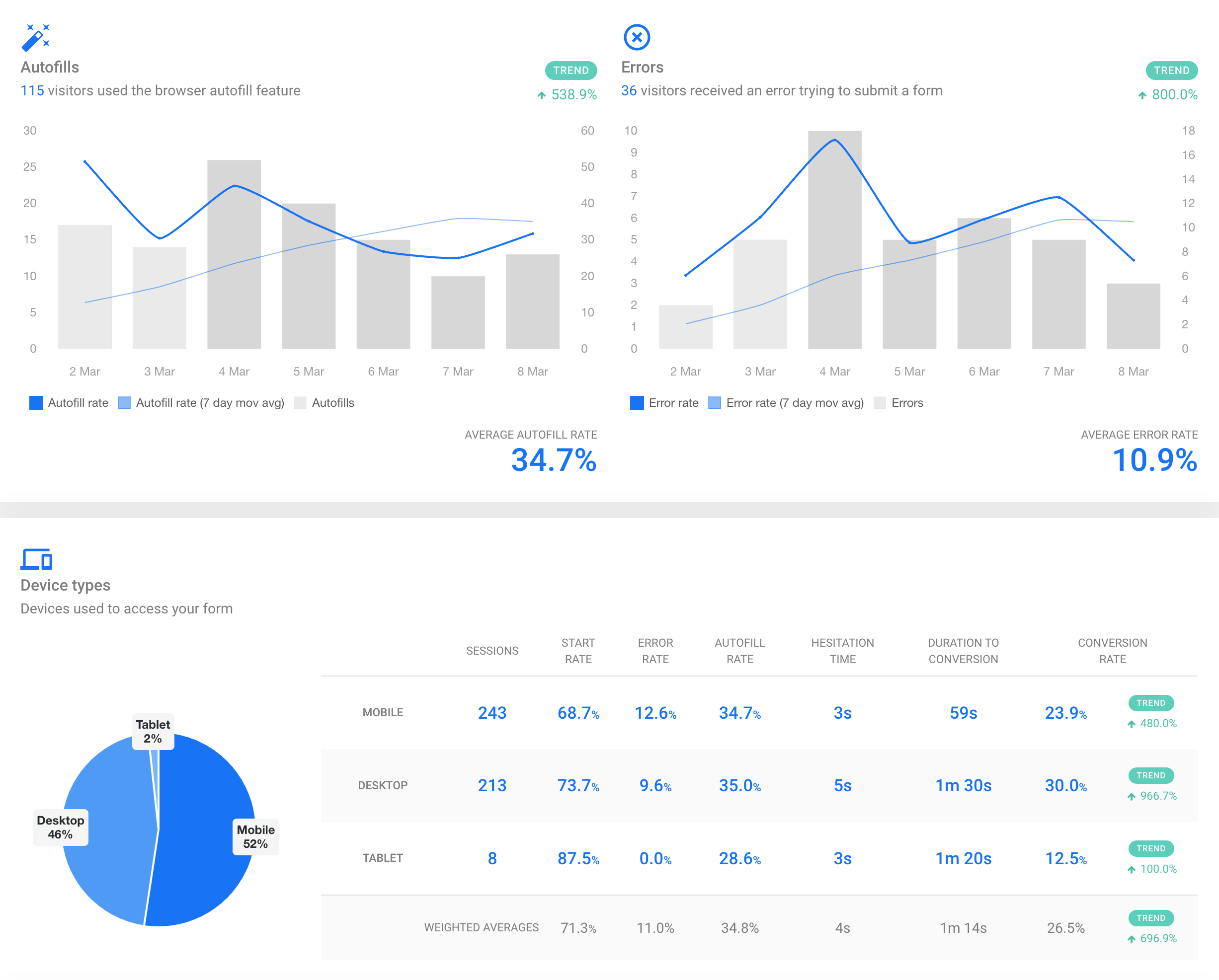
- Autofill adoption rate by browser and device
Pinpoint the exact field that's killing your conversion
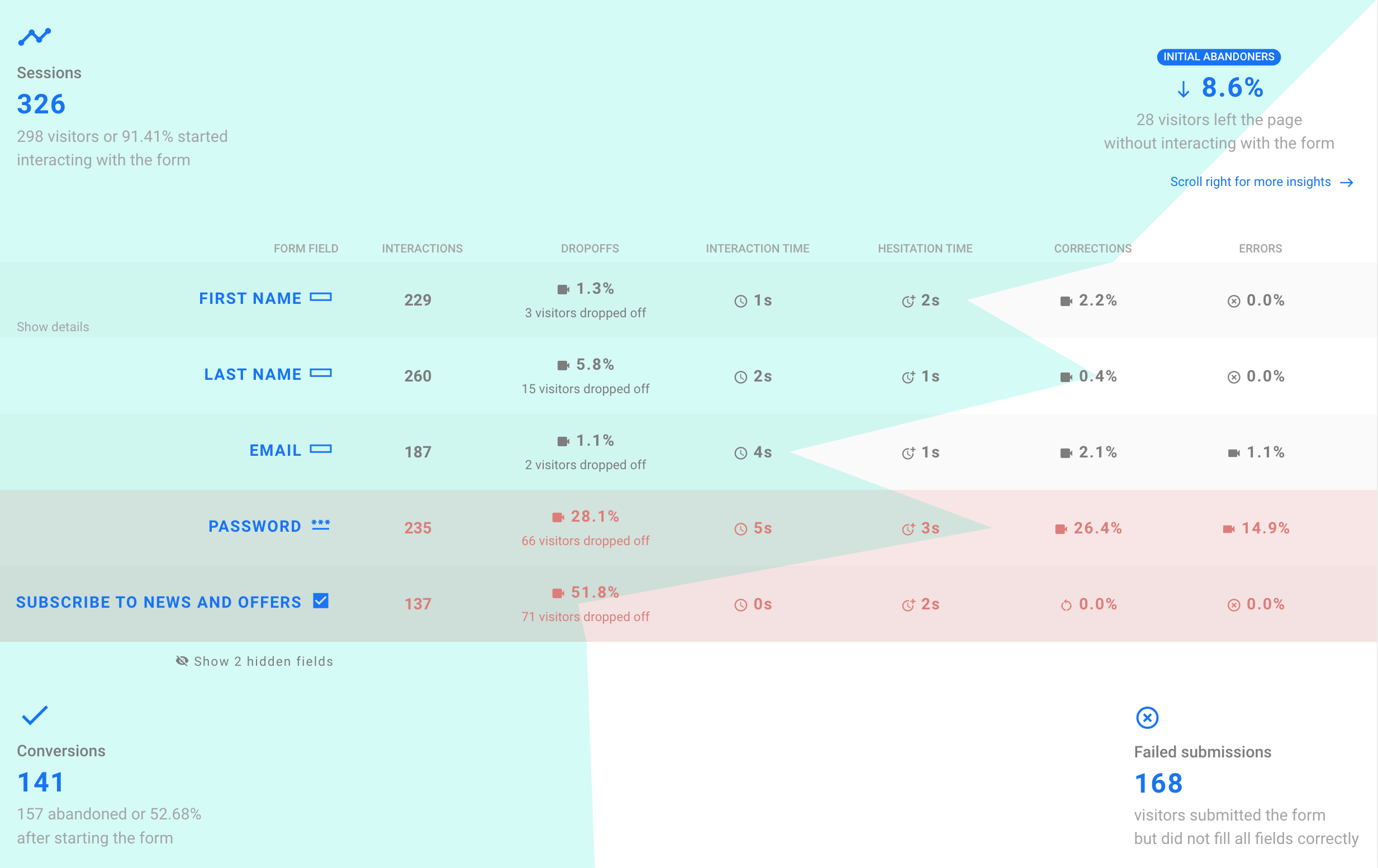
Not all form fields are created equal. Exatom measures interaction time, hesitation patterns, drop-off rates, and error frequencies for every single field — so you know where to act, not where to guess.
- Drop-off rate and abandonment rate per field
- Hesitation time — how long visitors pause before interacting
- Error notification frequency per field
- Fill-in order deviations and unusual interaction patterns
- Device and browser breakdown per field
Your AI CRO assistant that turns data into action
Exatom Form Analytics gives you the data. Eureka — our agentic AI consultant — tells you what to do with it. Ask Eureka which field to fix first, why your mobile conversion dropped, or how your forms compare to industry benchmarks.
- Instant CRO recommendations based on your live form data
- Root-cause analysis: Eureka connects the dots between metrics
- Benchmark comparisons with your industry vertical
- Prioritised action plan — highest impact fixes first
Most marketers are flying blind at the most critical moment
Of visitors who reach your form page never interact with a single field. Exatom shows you why — and where you're losing them before they begin.
The average time visitors hesitate before completing a web form. High hesitation on specific fields signals confusion, mistrust, or unnecessary friction.
Of users who fill in your form fail to submit it successfully. These are hot leads lost to validation errors or unclear labels you never knew about.
Exatom customers typically achieve a 10% or higher conversion uplift within their first months — directly translating to revenue without additional traffic spend.
Two levels of insight, one simple platform
Form metrics
Track performance across the complete lifecycle of every form on your site.
- Form start rate & total starts
- Conversion rate & total conversions
- Failed submits & re-submit recovery
- Form hesitation time
- Device & browser segmentation
- Autofill adoption rate
Field metrics
Drill down to individual field behaviour — the most actionable level of analysis.
- Drop-off & abandonment rate per field
- Interaction time & hesitation time
- Error notification frequency
- Fill-in order & interaction sequence
- Visitor interactions per field
- Field-level device breakdown

Integrations
Connects seamlessly with your existing analytics stack — no rip and replace.
- Google Looker Studio connector
- Google Analytics 4 complement
- Adobe Analytics compatible
- Tag manager compatible (GTM, Tealium)
- Single JS tag — no developers needed
- SPA & multi-step form support
"For Brooks Running, the value that Exatom provides on top of Adobe Analytics is the deeper granularity it performs on our forms. By zeroing into specific fields, we ensure our forms are optimised down to details missed in our UX research process. This led to a 4.2% increase in checkout conversions during the first year."
Frequently asked questions
Everything you need to know about Exatom Form Analytics. Can't find your answer? Contact us.
Stop guessing. Start converting.
Add one tag to your website and see exactly where your forms are losing revenue. No credit card. No developers. Just answers.